Details

TuneCraft Sound Canvas
Developer: Family Creations
Updated: 2026-07-21
Creative Music Educational

TuneCraft Sound Canvas

Reviews

TuneCraft Sound Canvas stands out for its simplicity and immediate feedback. The drag-and-drop character system makes music creation accessible, while volume controls allow for nuanced arrangements. It works seamlessly across devices without installation, making it ideal for spontaneous creativity. The open-ended nature encourages exploration, though the lack of save functionality means sessions are temporary. Overall, a solid choice for casual music makers and educators.

About this game

Sound Character Assembly

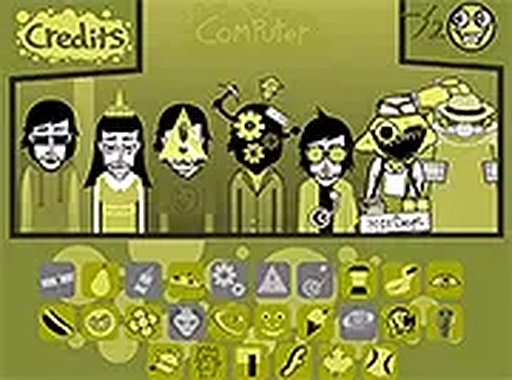
Each character in TuneCraft Sound Canvas produces a unique audio element, from rhythmic pulses to harmonic notes. By placing these figures on the board, you stack sounds to form layered compositions. The arrangement of characters directly influences the resulting music, encouraging thoughtful placement and experimentation. This system allows for both simple tunes and more complex arrangements as you become familiar with each character's contribution.

Real-Time Audio Feedback

As you add or remove characters from the board, the sound updates instantly. This immediate response helps you hear the effect of each change, making it easier to refine your composition. The interface remains responsive across desktop and mobile browsers, so you can work on your piece wherever you are. No software installation is needed, just a web connection.

Volume Balancing for Harmony

Each sound layer includes an adjustable volume control. By fine-tuning the loudness of individual characters, you can create a balanced mix where no single element overpowers the others. This feature is particularly useful when building dense arrangements, as it lets you highlight certain sounds while keeping others in the background. The controls are straightforward, requiring only a simple interaction.

Browser-Based Accessibility

TuneCraft Sound Canvas operates entirely within a web browser on both desktop and mobile devices. This means you can start a new composition without any downloads or account creation. The tool is designed for spontaneous use, whether you have a few minutes or an extended session. Full screen mode is available for a more focused workspace.

Encouraging Creative Exploration

The tool is built to support open-ended experimentation. There are no predefined goals or scores, allowing you to explore sound combinations freely. This makes it suitable for educational environments where students can learn about rhythm and melody through hands-on play. Families can also enjoy creating music together, as the controls are simple enough for children to grasp quickly.

Compatibility

This H5 game runs smoothly on:
• Desktop computers (Windows / Mac) • Mobile phones (iPhone / Android)
• Tablets (iPad / Android)
🌐 Best experienced with Chrome, Safari, or Edge

PLAY NOW

Faq

Can I save my compositions in TuneCraft Sound Canvas?
The tool does not include a built-in save feature. Compositions exist only during your session. To preserve your work, consider recording the audio output using external software or noting the character arrangement for later recreation.
Is TuneCraft Sound Canvas free to use?
Yes, the tool is available at no cost. It runs directly in your browser without any payment or subscription requirements. There are no hidden fees or in-app purchases.
Does TuneCraft Sound Canvas work on tablets and phones?
Yes, the interface is designed to function on both desktop and mobile browsers. Touch controls are supported, making it easy to use on tablets and smartphones. A stable internet connection is recommended for the best experience.
How many sound characters are available in TuneCraft Sound Canvas?
The exact number of characters may vary, but the tool includes a diverse collection, each with a distinct sound. The selection is intended to provide enough variety for creating interesting musical pieces without overwhelming beginners.
Can I use TuneCraft Sound Canvas in a classroom setting?
Absolutely. The tool's intuitive design and lack of complex instructions make it suitable for educational use. Teachers can use it to introduce concepts of rhythm, melody, and sound layering. No student accounts or installations are required.
What happens if I remove a character from the board?
Removing a character silences its sound layer immediately. This allows you to test how each element contributes to the overall piece. You can always add the character back later to reintroduce its sound.

Comments

0 comments
U
User
Loading comments...

Relevant Games

World Flags Learning Puzzle
Thinking Puzzle Educational

World Flags Learning Puzzle

Holiday Tile Swap Puzzle
Puzzle Thinking Logic

Holiday Tile Swap Puzzle

Penguin Cubes Puzzle Adventure
Skill Puzzle Casual

Penguin Cubes Puzzle Adventure

Uncle Hank's Farm Hidden Object Game
Observation Puzzle Casual

Uncle Hank's Farm Hidden Object Game

Glass Filling Puzzle Challenge
Skill Puzzle Strategy

Glass Filling Puzzle Challenge

Creative Cube Drawing Puzzle
Skill Puzzle Creative

Creative Cube Drawing Puzzle

Butterfly Hidden Object Puzzle
Skill Observation Puzzle

Butterfly Hidden Object Puzzle

Aurelia Foot Care Doctor Sim
Skill Caring Doctor

Aurelia Foot Care Doctor Sim

Plumber Coloring Fun Online
Thinking Creative

Plumber Coloring Fun Online

Piano Tile Rhythm Challenge
Arcade Classic Music

Piano Tile Rhythm Challenge

Word Builder Puzzle Challenge
Puzzle Word Games Educational

Word Builder Puzzle Challenge

Snow White Wellness Care Game
Care Wellness Education

Snow White Wellness Care Game